CRM - Customer Relationship Management
Full picture of sales opportunities, from first contact to closing the deal. Pipeline, sales activities and relationship history in one place.

The sales opportunity is the heart of CRM
Each opportunity is a complete contact card with company data, decision-maker, deal value and full interaction history.
Contact data
Company name, contact person's name and surname, position, email, phone, address and city. Flexible form supports companies, individuals and freelancers.
Deal data
Deal name, maximum transaction value, pipeline status, lead source, interest area and closing probability. Each deal has an assigned owner from the team.
Sales pipeline
Configurable statuses (e.g. New Lead → Contact → Qualification → Offer → Negotiation → Closed) with custom colors. Each status tracks opportunity count and total deal value.
Deal probability
Five-level closing probability scale - from 'very low' to 'very high'. Each level has its own emoji and percentage value for quick assessment at a glance.
Lead sources
Where did the lead come from? Website form, LinkedIn, referral, conference, partner or Google Ads. Source tracking measures the effectiveness of acquisition channels.
Interest areas
Definable client interest areas - e.g. software development, cloud migration, DevOps, cybersecurity. Enables contact base segmentation and offer matching.
Table and kanban - two ways to work
Switch with one click between table view and kanban board to see the pipeline from the most convenient perspective.
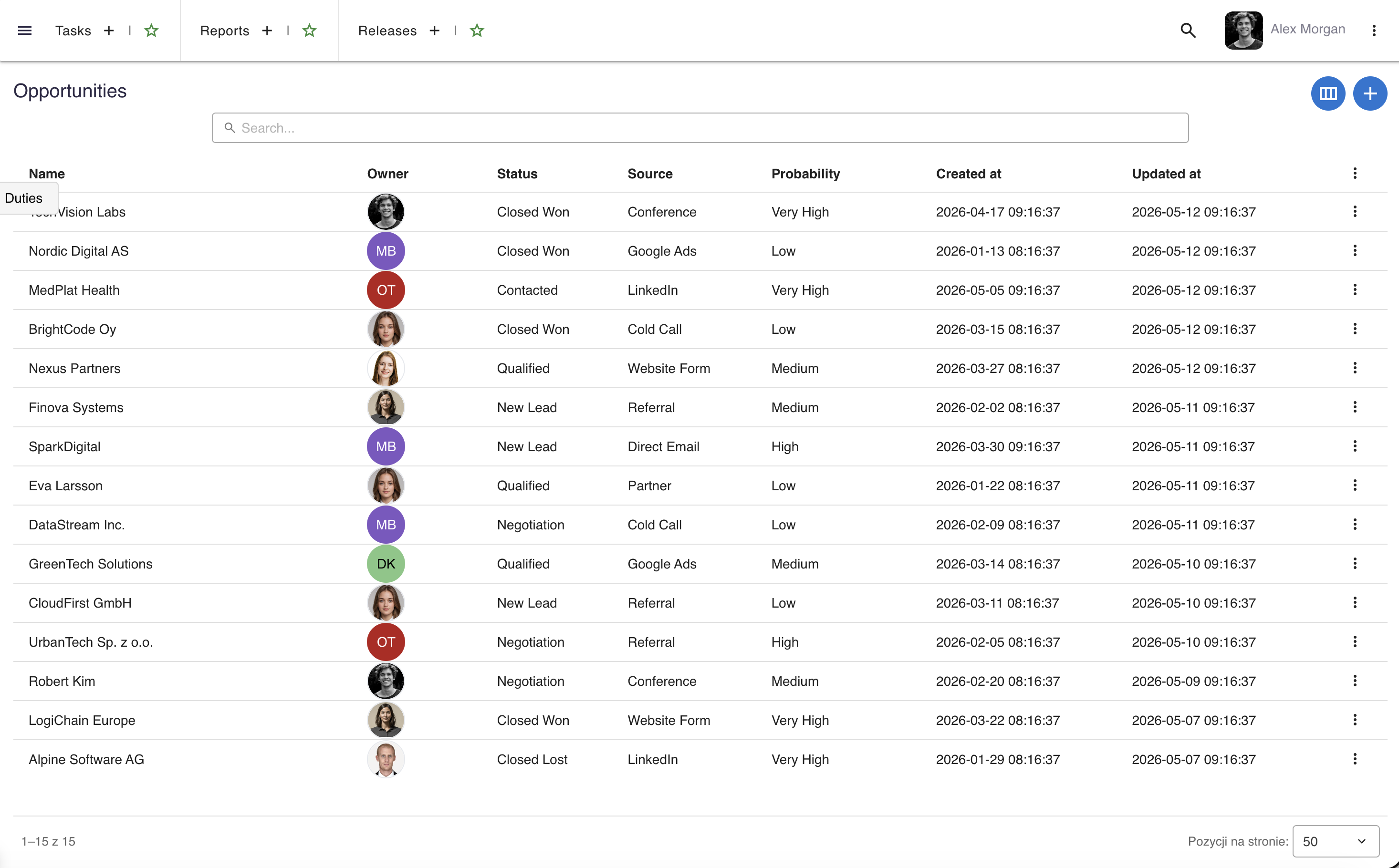
table_rows Table view
Classic opportunity list view with search across every column: contact name, owner, status, source, probability and dates. Double-click a row to edit.
- Owner avatars - quick identification of who is responsible for each opportunity
- Context actions - edit, activities, interest areas and contact elements accessible from the row menu
- Counters - badges on the menu show how many activities, areas and contact elements each opportunity has
view_column Kanban board
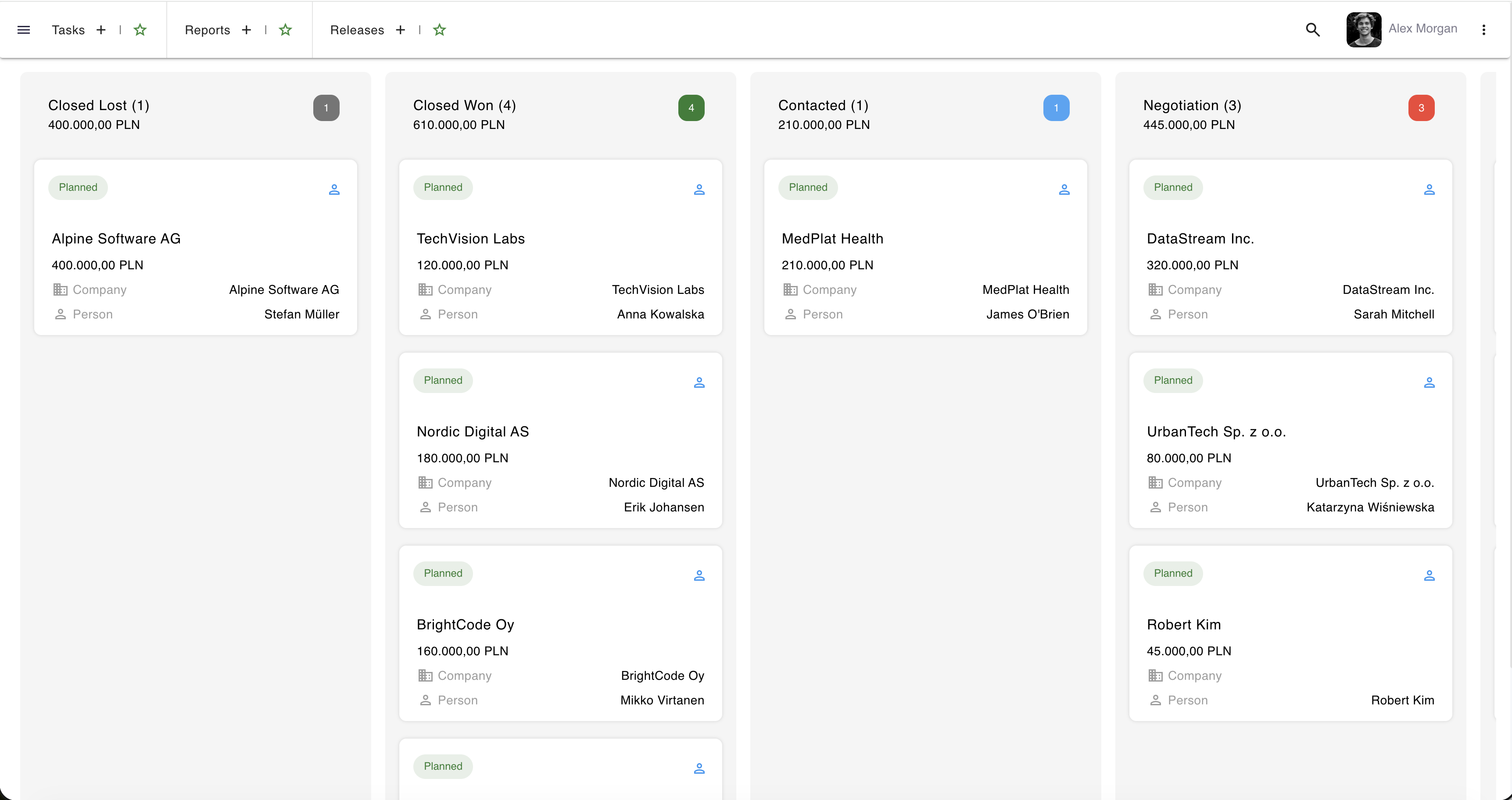
Visual sales pipeline in kanban style. Columns represent deal statuses, and cards display key information about each opportunity.
- Status columns - each column with a colored badge, opportunity count and total deal value
- Opportunity cards - company, person, deal value and owner on one card
- Activity indicator - green "Planned" when the opportunity has a scheduled activity, orange "Not planned" when none - so you know who to contact
Complete client interaction history
Every phone call, meeting, demo and email is logged as an activity with date, duration, type and notes.
Activity types
Configurable types with colors: phone call, video conference, in-person meeting, email, demo presentation, follow-up, contract negotiation. Each organization can add custom types.
Activity statuses
Each activity has a status: planned, in progress, completed, cancelled or postponed. Status enables filtering upcoming tasks and checking which contacts need attention.
Calendar & scheduling
Each activity has precise start and end dates and times. The system automatically sets the calendar date, and kanban cards show the next scheduled activity date.
Activity notes
Each activity can contain detailed notes - meeting minutes, client feedback, technical requirements. A knowledge base about the relationship, available to the entire sales team.
Seven dictionaries - full customization
The CRM module is fully customizable to your organization's sales processes through seven configurable dictionaries.
Contact statuses
Sales pipeline stages with colors, activity flags and default status.
Contact sources
Lead acquisition channels - website, social media, referrals, events, partners, ads.
Activity types
Types of sales interactions with colors and activity flag - from phone calls to negotiations.
Activity statuses
Activity execution states - planned, in progress, completed, cancelled, postponed.
Interest areas
Client segmentation by products and services - for matching offers and communication.
Deal probabilities
Transaction closing probability scale with emoji and percentage level.
Want to see more?
A meeting is the fastest way to see how say.work can streamline your team's work.
call Let's talk